
BBK – Registration and Reporting Procedure
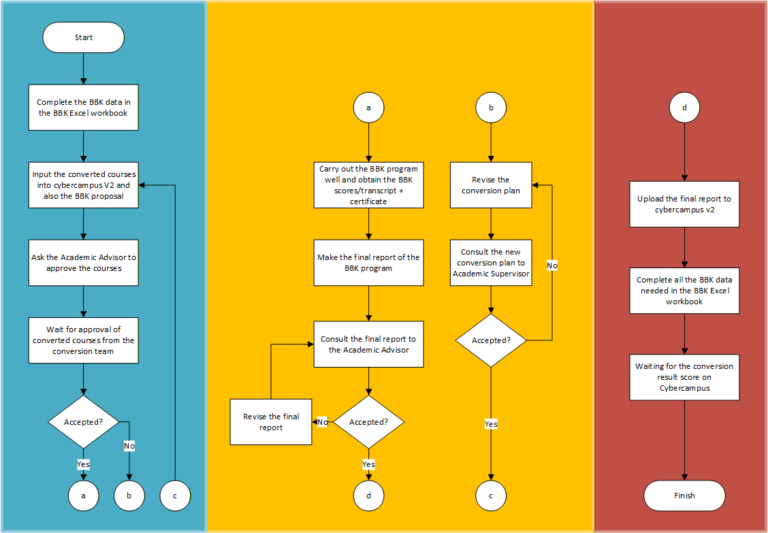
Stages of the BBK – Registration and Reporting Procedure for The Bachelor of Information Systems
- Complete the BBK data in the BBK Excel workbook. Link: https://s.id/MBKM_SIUA
- Input the converted courses into cybercampus V2 and also the BBK proposal. The converted course list must be approved by the Academic Advisor.
- Ask the Academic Advisor to approve the courses.
- Wait for approval of converted courses from the conversion team. If the courses are not acceptable, the student must revise them.
- Carry out the BBK program well and obtain the BBK scores/transcript + certificate. The student can get consultation with the Academic Advisor if needed during the program.
- Make the final report of the BBK program. Don’t forget to include the transcript and also certificate as the report attachment.
- Consult the final report to the Academic Advisor and revise the Final Report if the Academic Advisor ask for it.
- Upload the final report to cybercampus v2.
- Complete all the BBK data needed in the BBK Excel workbook.