
Judicial Procedures
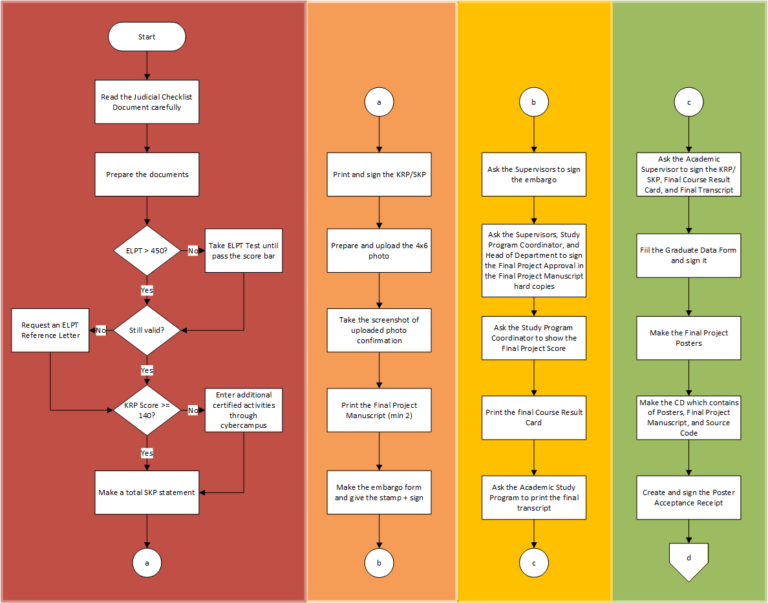
Stages of the Judicial for The Bachelor of Information Systems
- Read the Judicial Checklist Document carefully. Link:
Prepare these documents. The following documents can be prepared in advance before passing the Final Project Seminar:
- PKKMB Certificate
- High School Diploma/Equivalent
- Identity Card (KTP)
- Proof of having paid UKT
- ELPT Certificate
- SKP Transcript/Achievement Plan Card (KRP)
- Formal photo for the Bachelor’s Diploma
- Proof of verification of the formal photo uploaded
- Final Project Proposal Approval Sheet
- Final Project Proposal Manuscript Approval or Final Project Proposal Manuscript Binding and Duplication Approval Letter
- Proof of having paid UKT can be obtained by taking a screenshot of Financial History in Cybercampus.
- ELPT Certificate can be accepted if the score is above 450 and is still valid. If the validity period has expired, students can apply for an ELPT Reference Letter. However, students who score below 450, must take the ELPT test until they pass the exam bar.
- SKP Transcript/Achievement Plan Card (KRP) if the score is above 140. Don’t forget to sign the document, then ask the Academic Advisor to sign as well.
- Prepare the 4×6 photo according to the provisions stated in https://pendidikan.unair.ac.id/v2/index.php/foto-ijazah/
- Upload the photo on the following link: https://lda.pendidikan.unair.ac.id/webfoto/. A After a few moments, the Directorate of Education will confirm your photo and notify the student via WhatsApp message. Proof of verification of the formal photo uploaded is a screenshot of this WhatsApp message.
- After completing the Final Project Seminar and its revisions, prepare these documents:
- Final Project Manuscript
- Final Project Approval Sheet
- Final Project Manuscript Approval or Final Project Manuscript Binding and Duplication Approval Letter
- Embargo Letter
- Final Course Result Card (KHS)
- Academic Transcript
- Final Project Abstract in English
- Final Project Abstract in Bahasa Indonesia
- Graduate Data Form
- Final Project Poster in English
- Final Project Poster in Bahasa Indonesia
- Poster Acceptance Receipt
- Screenshot of Uploaded Final Project Manuscript
- Letter of Scientific Work Submission
- Letter of Free Borrowing form Library Repository
- Letter of RBC Book Loan Free and Final Project Manuscript Acceptance Letter
- Journal Article (Optional)
- Print the Final Project Manuscript (hard copy) at least two (2) times. Students must add headers and footers that mark the contents are belong to Universitas Airlangga library to the document.
- Make and print the Embargo Letter. Don’t forget to put the legal stamp (Materai 10.000) and sign the letter.
- Ask the 1st and 2nd supervisor to sign the Embargo Letter and Final Project Approval Sheet which is inside of the Final Project Manuscript hard copy
- Ask the Study Program Coordinator to sign the Final Project Approval Sheet and show the Final Project score. After that, ask the Head of Department to sign the Final Project Approval Sheet too.
- Print the Final Course Result Card (KHS) which contains of Final Project Score.
- Ask the Study Program Academic to print out the Final Transcript.
- Ask the Academic Advisor to sign the Final Course Result Card (KHS) and Final Transcript.
- Fill the Graduate Data Form and sign it. Make sure that the student input the final GPA.
- Make Final Project posters in English and Bahasa Indonesia. Save them as .pdfs
- Make the CD which contains of Posters, Final Project Manuscript, and Source Code (optional).
- Create and sign the Poster Acceptance Receipt.
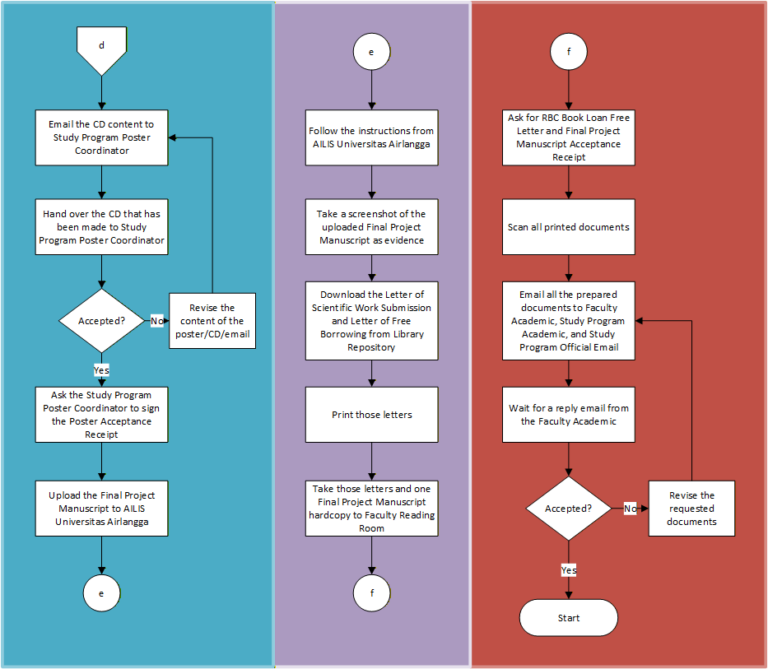
- Email the CD content to Study Program Poster Coordinator with email address: poster.siunair@gmail.com.
- Hand over the CD that has been made to Study Program Poster Coordinator. If there are revisions from the Study Program Poster Coordinator, the student must revise them.
- Ask the Study Program Poster Coordinator to sign the Poster Receipt.
- Upload the Final Project Manuscript to AILIS Universitas Airlangga and follow the instructions until the end.
- Take a screenshot of the uploaded Final Project Manuscript as a proof that the student has uploaded the Final Project Manuscript.
- Download the Letter of Scientific Work Submission and Letter of Free Borrowing from Library Repository, the print those letters.
- Take those letters and one Final Project Manuscript hardcopy to Faculty Reading Room.
- Ask for RBC Book Loan Free Letter and Final Project Manuscript Acceptance Receipt.
- Scan all printed documents.
- Email all the prepared documents to Faculty Academic (syaratyudisium@gmail.com) with cc (Carbon Copy) to Study Program Academic (yuliika26@gmail.com) and Study Program Official Email (sisteminformasi@fst.unair.ac.id).
- Wait for a reply email from the Faculty Academic. If any documents are missing or need to be corrected, the student is required to comply with the request and send all documents again via email.
Stages of the Judicial for The Bachelor of Information Systems
- Read the Judicial Checklist Document carefully. Link:
- Prepare these documents. The following documents can be prepared in advance before passing the Final Project Seminar:
- PKKMB Certificate
- High School Diploma/Equivalent
- Identity Card (KTP)
- Proof of having paid UKT
- ELPT Certificate
- SKP Transcript/Achievement Plan Card (KRP)
- Formal photo for the Bachelor’s Diploma
- Proof of verification of the formal photo uploaded
- Final Project Proposal Approval Sheet
- Final Project Proposal Manuscript Approval or Final Project Proposal Manuscript Binding and Duplication Approval Letter
- Proof of having paid UKT can be obtained by taking a screenshot of Financial History in Cybercampus.
- ELPT Certificate can be accepted if the score is above 450 and is still valid. If the validity period has expired, students can apply for an ELPT Reference Letter. However, students who score below 450, must take the ELPT test until they pass the exam bar.
- SKP Transcript/Achievement Plan Card (KRP) if the score is above 140. Don’t forget to sign the document, then ask the Academic Advisor to sign as well.
- Prepare the 4×6 photo according to the provisions stated in https://pendidikan.unair.ac.id/v2/index.php/foto-ijazah/
- Upload the photo on the following link: https://lda.pendidikan.unair.ac.id/webfoto/. A After a few moments, the Directorate of Education will confirm your photo and notify the student via WhatsApp message. Proof of verification of the formal photo uploaded is a screenshot of this WhatsApp message.
- After completing the Final Project Seminar and its revisions, prepare these documents:
- Final Project Manuscript
- Final Project Approval Sheet
- Final Project Manuscript Approval or Final Project Manuscript Binding and Duplication Approval Letter
- Embargo Letter
- Final Course Result Card (KHS)
- Academic Transcript
- Final Project Abstract in English
- Final Project Abstract in Bahasa Indonesia
- Graduate Data Form
- Final Project Poster in English
- Final Project Poster in Bahasa Indonesia
- Poster Acceptance Receipt
- Screenshot of Uploaded Final Project Manuscript
- Letter of Scientific Work Submission
- Letter of Free Borrowing form Library Repository
- Letter of RBC Book Loan Free and Final Project Manuscript Acceptance Letter
- Journal Article (Optional)
- Print the Final Project Manuscript (hard copy) at least two (2) times. Students must add headers and footers that mark the contents are belong to Universitas Airlangga library to the document.
- Make and print the Embargo Letter. Don’t forget to put the legal stamp (Materai 10.000) and sign the letter.
- Ask the 1st and 2nd supervisor to sign the Embargo Letter and Final Project Approval Sheet which is inside of the Final Project Manuscript hard copy.
- Ask the Study Program Coordinator to sign the Final Project Approval Sheet and show the Final Project score. After that, ask the Head of Department to sign the Final Project Approval Sheet too.
- Print the Final Course Result Card (KHS) which contains of Final Project Score.
- Ask the Study Program Academic to print out the Final Transcript.
- Ask the Academic Advisor to sign the Final Course Result Card (KHS) and Final Transcript.
- Fill the Graduate Data Form and sign it. Make sure that the student input the final GPA.
- Make Final Project posters in English and Bahasa Indonesia. Save them as .pdfs
- Make the CD which contains of Posters, Final Project Manuscript, and Source Code (optional).
- Create and sign the Poster Acceptance Receipt.
- Email the CD content to Study Program Poster Coordinator with email address: poster.siunair@gmail.com.
- Hand over the CD that has been made to Study Program Poster Coordinator. If there are revisions from the Study Program Poster Coordinator, the student must revise them.
- Ask the Study Program Poster Coordinator to sign the Poster Receipt.
- Upload the Final Project Manuscript to AILIS Universitas Airlangga and follow the instructions until the end.
- Take a screenshot of the uploaded Final Project Manuscript as a proof that the student has uploaded the Final Project Manuscript.
- Download the Letter of Scientific Work Submission and Letter of Free Borrowing from Library Repository, the print those letters.
- Take those letters and one Final Project Manuscript hardcopy to Faculty Reading Room.
- Ask for RBC Book Loan Free Letter and Final Project Manuscript Acceptance Receipt.
- Scan all printed documents.
- Email all the prepared documents to Faculty Academic (syaratyudisium@gmail.com) with cc (Carbon Copy) to Study Program Academic (yuliika26@gmail.com) and Study Program Official Email (sisteminformasi@fst.unair.ac.id).
- Wait for a reply email from the Faculty Academic. If any documents are missing or need to be corrected, the student is required to comply with the request and send all documents again via email.